
Video Steps: How to register for your 2027 membership
After you follow the video guide, the final step is to complete your payment
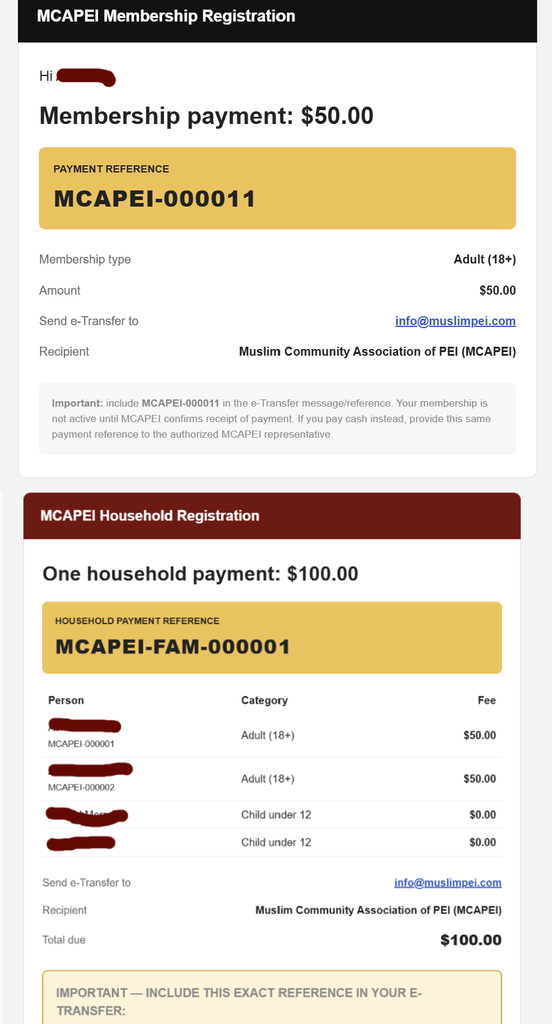
Once you have submitted your registration, you will receive a payment request by email, similar to the examples images shown below:
- Individual Membership: Refer to the first image.
- Family Membership: Refer to the second image.
Your payment request will include a unique Membership ID, highlighted in yellow. You must use this ID when making your payment so we can correctly identify and process your registration.
Option 1: Pay by E-Transfer
When sending your Interac e-Transfer, you MUST enter your Membership ID highlighted in yellow in the message/comment section of the transfer.
Examples:
- Individual Membership:
MCAPEI-000011 - Family Membership:
MCAPEI-FAM-000001
Important: These are examples only. Always use the unique Membership ID provided in your payment request email.
Option 2: Pay by Cash
If you prefer to pay by cash, please follow these instructions:
- Place the exact payment amount in a sealed envelope.
- Clearly write your Membership ID (provided in your email; highlighted it in yellow) on the outside of the envelope.
- Deliver the envelope to the MCAPEI office or an MCAPEI Board of Directors member
.
Important Reminder
Your Membership ID is required for all payment methods. This helps us match your payment with your registration and avoid delays in processing your membership.
Please keep a copy of your payment confirmation for your records.
Still Need Assistance?
Please don't hesitate to contact me directly via WhatsApp or email us at **info@muslimpei.com. We're happy to help!
Become a member or renew your membership and help strengthen our Muslim community in PEI!
Please share this message with your family and friends.
Jazakum Allahu Khairan!